MRC PDF Kompressor 4.3.0
Professional document compression with Mixed Raster Content technology – up to 95% size reduction, pattern-safe – suitable for replacement scanning under BSI TR-RESISCAN.
Download now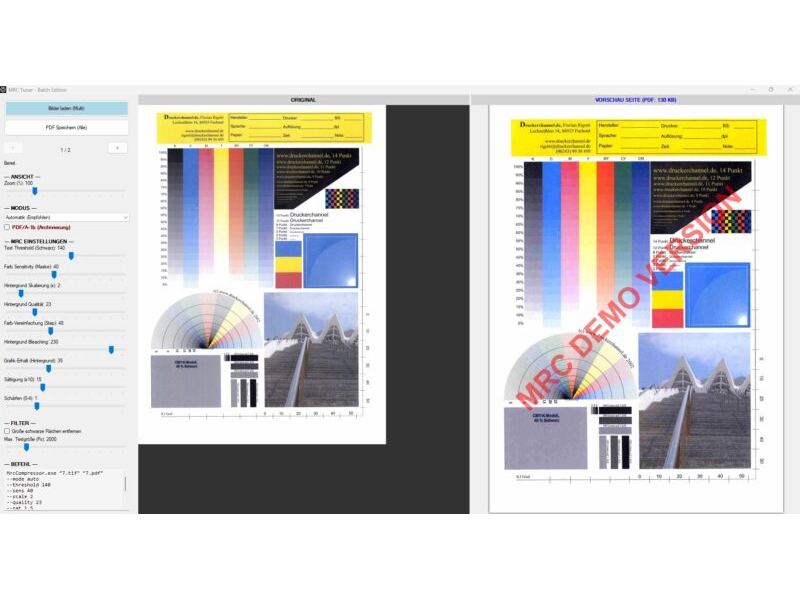
Description & documentation
Professional document compression
The MRCCompressor is a powerful tool for converting scanned images (TIF, JPG, PNG) and PDF files into extremely compact PDF files for archiving – PDF/A and searchable via text recognition (OCR) on request.
By using the Mixed Raster Content (MRC) method, the software separates text from image backgrounds. The result is documents that are up to 95% smaller than the original, while keeping the text crisp and perfectly legible.
This version uses a newly developed hybrid engine that requires no expensive commercial licences and delivers results comparable to the market leaders.
What's new
Version 4.3.0 (October 2026)
- New: PDF as input – PDFs to PDF/A: besides TIFF, JPEG and PNG, MRC PDF Kompressor now accepts PDF files, e.g. from copiers and scanners or digitally created invoices. Every page is rendered and processed like a scan: a 2.4 MB two-page copier PDF becomes a 136 KB PDF/A-2b, searchable via OCR on request. Existing text is kept – the digital text of an invoice as well as a scanner's text layer – exactly and without recognition errors; OCR then only adds text found in images. Links, bookmarks and title, author, subject and keywords are carried over. Form fields stay visible but can no longer be filled in, digital signatures are lost – the program points this out when loading. Encrypted PDFs are not processed.
- Safe writing: the output is first written to a neighbouring file and replaces the target only on success – an error or cancellation no longer leaves a broken PDF behind. The command line only overwrites an existing foreign PDF with
--overwrite. - Text recognition in Chrome: the invisible text layer is now complete in the PDF viewer of Google Chrome (and other programs using its PDF engine PDFium) as well. So far, single-character words such as "a", "1" or "€" and many spaces were missing there, and on pages scanned sideways whole lines were glued into one word – search and copy did not find them.
- Selectable PDF/A level: in addition to PDF/A-1b now also PDF/A-2b, -2u, -3b, -3u and PDF/A-4 – in the interface via the selector next to "PDF/A", on the command line with
--pdfa 2betc. From PDF/A-2 on the background stays JPEG2000: the file is identical in appearance to the output without PDF/A. PDF/A-1b, in contrast, has to re-encode the background as JPEG – for text pages of the sample scans the file grows by 56–66 %, for plans it gets smaller but less faithful to the original. Every level is validated with the reference validator veraPDF, also with text recognition, colour text layers and watermark. - Note, changed default:
--pdfawithout a level now creates PDF/A-2b (up to 4.2.0: PDF/A-1b), and the interface preselects 2b as well. If you still need PDF/A-1b – for example because an archive system only accepts PDF/A-1 – add--pdfa 1b. Custom profiles from 4.2.0 with PDF/A stay at PDF/A-1b. An unknown level aborts with exit code 2 instead of silently writing a different level.
Version 4.2.0 (October 2026)
- Text recognition (OCR), optional: places an invisible, word-accurate text layer over the page – the PDF becomes searchable, text can be selected and copied, the page image stays unchanged. Switch "OCR: text layer (searchable)" in the interface,
--ocron the command line; can be stored in custom profiles and combined with PDF/A. Recognition runs locally without any cloud service (PaddleOCR models on ONNX Runtime), reads German umlauts and ß as well as Latin scripts, also on pages scanned sideways or upside down. Cost per A4 page: about 2–5 seconds (depending on the processor) and around 6 KB of file size. - Custom profiles: create any number of named profiles – mode, all sliders and switches (e.g. PDF/A) are saved. In the interface via "Einstellungen als Profil speichern..." (save settings as profile) → "Als eigenes Profil speichern..."; rename and delete under "Eigene Profile verwalten...". Custom profiles appear directly in the mode selection.
- Command line:
--profile "Name"runs a custom profile without listing the individual parameters; further parameters override it.--profileslists all profiles. For custom profiles the interface shows the short call. - Command line: new counter-switches
--nopdfa,--nojbig2symbols,--outline,--inpaint,--colorfgto lift a profile's switches for a single call. - True-colour text layers: coloured text, stamp rings and lines now take the colour of their stroke core. Previously the edge, mixed with the paper, flowed into the layer colour and made red and blue text look pale (measured on a sample page: red RGB 184/95/89 instead of 166/64/58 in the original, now 167/64/59). Filled areas keep their mixed colour.
- PDF/A-1b validated with veraPDF: the PDF/A output used to contain compressed cross-reference streams (a PDF 1.5 feature not allowed in PDF/A-1). Now all test documents pass the reference validator veraPDF – also with text recognition, colour text layers, symbol mode and watermark.
- JBIG2 encoding inside the program: text masks are now encoded as JBIG2 directly in MRC PDF Kompressor (generic, pattern-safe) – byte-identical to the previous tool jbig2enc, but faster and without an extra runtime. Fixes a bug: on computers without the Visual C++ 2013 runtime the text mask silently fell back to the larger CCITT G4 method. jbig2.exe is now only needed for the optional symbol mode.
- Installer: in addition to the ZIP there is a signed setup (Inno Setup) – installation without administrator rights for your own user or for all users, Start menu entry, uninstall via Windows Settings. Custom profiles are kept on updates. The setup installs missing Microsoft runtimes on request.
- "Text" profile: background at half resolution (150 dpi for 300-dpi scans), like all other profiles. Text and colour text stay at 300 dpi. In text mode, documents with graphics or photos become 55–70 % smaller; text documents are processed about a third faster and need up to two thirds less memory.
Version 4.1.0 (September 2026)
- The "Text 2" and "Graphic 2" profiles now run the same pipeline as "Text" and "Graphic" – previously bleaching, posterisation and silhouette had no effect in "Text 2", and "Graphic 2" incorrectly received a text mask.
- Considerably lower memory usage: text mask detection without integral images, inpainting with a front-line method, memory released per page (A3 batch: roughly 5 GB → 2.5 GB), with identical results.
- Interface: PDF generation now runs in the background with progress display and cancel; sliders also take effect in automatic mode, new "Load profile values" button.
- Command line: folders and wildcards as input, per-page progress, summary (KB before/after, time), exit codes, new
--dpiparameter, protection against overwriting input files, time limits for jbig2/potrace. - Images without DPI information no longer produce oversized pages.
- Log and profiles fall back to
%LOCALAPPDATA%\MrcCompressorif the program folder is write-protected; log rotation from 5 MB. - Factory setting "Text": vectorisation off (pattern-safe even without the supplied
mrc_profiles.xml). - Distribution: x64 components only, signing and ZIP via
build-release.ps1, regression test project (MrcCompressor.Regression). - Uniform backgrounds (blank pages, fully bleached text pages) came back from the JPEG2000 encoder with brightness 240 instead of 255, making the page look grey. Such backgrounds are now encoded losslessly (approx. 250 bytes).
- "Text 2" profile: edge optimisation 30 → 0 (no more smearing along lines, coloured plan pages roughly 25 % smaller).
- Interface: "Info & licence" row with info dialog (version, licence model, third-party notices) and a link to the product page kreutzweb.de.
Version 4.0.1 (September 2026)
- Command line: new
text2/image2modes; new parameters--jp2depth,--posterize,--edgelum,--edgesatplus off-switches for all profile options. - Command line: profiles from
mrc_profiles.xmlnow also apply with a fixed mode; parameters given also take effect in automatic mode. - Interface: the displayed command line for "Text 2" / "Graphic 2" corrected, JP2 colour depth and silhouette values are now included in the output.
- Command line:
--helplists all options; output and warnings appear in the calling console window.
Version 4.0 (July 2026)
- Colour text layers: coloured headings, stamps and logos stay sharp and true to colour (up to 4 automatically detected colour layers at 300 DPI).
- JBIG2 compression of the text mask (pattern-safe, no character substitution); optional symbol mode for maximum compression (
--jbig2symbols). - Smart Inpainting now fills text areas with the real paper colour instead of white – no more light halos on coloured or grey paper.
- Multi-page TIFF files are supported (each page becomes its own PDF page).
- Considerably faster: parallel page processing and optimised filters (batch processing about 40–50 % faster, correspondingly more on multi-core CPUs).
- PDF/A-1b output reworked: JPEG instead of JPEG2000 for the background, colour profile (sRGB) embedded.
- Small dark elements (bullet points, ticked checkboxes, punch holes) are reliably preserved.
- Preview without freezing (background computation) and new switches in the interface for colour text layers, Smart Inpainting, edge silhouette and JBIG2 symbol mode.
- Download size halved (31 instead of 62 MB); new licence model (PolyForm Small Business License 1.0.0).
The highlights (features)
- Extremely high compression: reduces file sizes from, e.g., 5 MB to under 100 KB (in text mode). In an internal comparison test with 23 sample pages, the total result is only half the size of a leading commercial MRC solution. On pure text pages that product is only slightly smaller thanks to JBIG2 symbol matching – with the same method, MRC PDF Kompressor is around 60 % smaller there.
- Pattern-safe for replacement scanning: JBIG2 compression without symbol matching – no characters are replaced or altered. This makes the method suitable for scanning processes under BSI TR-RESISCAN; conformity itself applies to your organisation's entire scanning process.
- Colour text layers: coloured headings, stamps, logos and markings are automatically detected and preserved as separate, crisp 300-DPI layers in their original colour, instead of blurring into the compressed background.
- Smart Inpainting: reconstructs the background behind the text with the real paper colour – no artefacts, better compression.
- Background Bleaching: removes grey haze and noise for pure-white backgrounds.
- PDF/A-1b to PDF/A-4: long-term archivable files to ISO 19005 in the level your archive requires (1b, 2b, 2u, 3b, 3u or 4), each level validated with the reference validator veraPDF. From PDF/A-2 on the background stays JPEG2000 – as small as without PDF/A.
- NEW – PDFs to PDF/A: PDF files from copiers and scanners become small, searchable PDF/A files – processed page by page like a scan; existing text, links and bookmarks are kept.
- NEW – searchable PDFs (OCR): on request, the built-in text recognition places an invisible text layer over the scan. Full-text search, selecting and copying work while the compression is kept (around 6 KB per page). Everything runs locally, without a cloud service.
- Multipage TIFF: multi-page TIFF files are automatically converted into multi-page PDFs.
- Split-view interface with real-time preview (original vs. result), synchronised zoom and layer view – the preview computes in the background without blocking operation.
- Batch & CLI: fully automatable via the command line, with parallel page processing for high throughput. Custom profiles from the interface can be called directly with
--profile "Name".
How it works
The tool splits the scanned image into several layers (Mixed Raster Content):
- Text mask: the black text is extracted at high resolution (300 DPI) and compressed space-efficiently as JBIG2 – using a pattern-safe method without character substitution (CCITT G4 as fallback).
- Colour text layers (new): coloured text, stamps and logos are grouped by colour and embedded as separate, crisp layers in their original colour.
- Background layer: paper structure and images are processed separately, smoothed and efficiently compressed as JPEG2000 or JPEG.
- Text layer (optional, new): text recognition (OCR) reads the page and places the recognised text invisibly and word-accurately over the image – for full-text search, selecting and copying.
In the final PDF these layers are overlaid exactly – the result is a fraction of the original size with full legibility.
Instructions & operation
1. Graphical interface (GUI)
Start MrcCompressor.exe for interactive mode:
- Load images or PDF files (also several).
- Use the sliders on the left to find the perfect balance between quality and size.
- Or: choose between "Text Optimised" (for invoices/letters) and "Graphic Optimised" (for certificates/photos).
- Copy the command generated at the bottom left for your scripts.
- Save the generated PDF file.
2. Command line (CLI)
Ideal for servers or batch scripts.
Syntax: MrcCompressor.exe "Input.tif" "Output.pdf" [options]
Example:
MrcCompressor.exe "Scan01.tif" "ArchivScan01.pdf" --mode text --pdfa
Note: every mode starts with the matching profile from mrc_profiles.xml, exactly like the interface. Parameters you specify override the profile – including in automatic mode after page detection. The command line shown in the interface therefore reproduces the preview exactly. MrcCompressor.exe --help lists all options in the calling window.
Inputs: folders (all image files) and wildcards (*.tif, *.pdf) are allowed, with natural sorting (page2 before page10). PDF files are taken over page by page; existing text, links and bookmarks are kept. The output is the last argument ending in .pdf; if omitted, <input>.pdf or <input>_batch.pdf is used, for a single PDF <name>_pdfa.pdf (with PDF/A) or <name>_mrc.pdf. Input files are never overwritten.
Exit codes: 0 = ok, 1 = error / no page, 2 = usage error (for scripts).
Important parameters:
- --mode [auto|text|image|text2|image2]: selects the algorithm (automatic, text bleaching, image preservation, or the corresponding "2" variant with adjusted profile defaults).
- --pdfa [level]: creates a PDF/A file, level 2b (default), 1b, 2u, 3b, 3u or 4 (requires srgb.icc in the folder).
- --ocr: adds an invisible text layer – the PDF becomes searchable (requires the ocr folder).
- --threshold [0-255]: sensitivity of text detection (default: from the selected profile, 30 in the "Text" profile).
- --noblobs: automatically removes large black borders from the text mask.
When called via the command line (CMD/PowerShell), the following parameters are available:
Parameter overview for MRC Compressor
This overview describes all available settings of the MRC Compressor. They can be controlled both via the user interface (GUI) and via the command line (CLI).
The settings are stored in the file mrc_profiles.xml.
Main settings
| Setting | CLI parameter | Explanation | Default |
|---|---|---|---|
| Mode | --mode [auto/text/image/text2/image2] | Controls the processing strategy. Auto: automatically detects whether a page is text or graphic. Text: optimised for sharp text, removes background details. Image: preserves colours and photos, but needs more storage space. Text 2 / Graphic 2: variants with adjusted profile defaults (see mrc_profiles.xml) – since 4.1.0 they run the same pipeline as "Text" and "Graphic". | Auto |
| Auto-Detect Threshold | --autothresh [0-100] | Sensitivity threshold for auto mode. Specifies what percentage of the page must be "colourful" for it to be recognised as graphic/image. Low (default 2%): even small coloured logos switch to graphic mode – the page is stored as a colour-true image. High (e.g. 15%): only real photos switch over; documents with colour accents stay in text mode, and coloured text goes into the colour text layers. | 2% |
| PDF/A | --pdfa [1b|2b|2u|3b|3u|4] | Creates a PDF/A file for long-term archiving. 1b: PDF 1.4, for systems that require PDF/A-1; JPEG background, opaque watermark. 2b: PDF 1.7, the background stays JPEG2000 – as small as without PDF/A. 2u: like 2b, plus all text extractable as Unicode (useful with --ocr).3b / 3u: like 2b / 2u to part 3 of the standard. 4: PDF 2.0, only if a system requires PDF/A-4. | Off (level 2b) |
| OCR (text layer) | --ocr / --noocr | Text recognition: places an invisible, searchable text layer over every page (locally, no cloud). Costs about 2–5 seconds and around 6 KB per A4 page and can be combined with --pdfa. If the program folder ocr is missing, the PDF is created without a text layer and a warning is shown. | Off |
MRC segmentation (mask & text)
| Setting | CLI parameter | Explanation |
|---|---|---|
| Text Threshold | --threshold [0-255] | "Where does text end, where does background begin?" Determines how dark a pixel must be to be recognised as text. 0 = pure black only, 255 = everything. A higher value also detects lighter/grey text, but risks recognising dirt as text. |
| Colour Sensitivity | --sens [0-100] | Determines how sensitively the mask ignores colour differences. A high value merges similar colours, which makes the mask cleaner ("less blotchy"). |
| Remove blobs | --noblobs | When active, large black areas (e.g. black borders from scanning) are automatically removed and assigned to the background. |
| Max. text size | --blobsize [px] | Maximum size (in pixels) an object may have to still count as "text". Anything larger is treated as graphic/background. |
Background optimisation
| Setting | CLI parameter | Explanation |
|---|---|---|
| Background scaling | --scale [1-10] | Strongest factor for the file size. The background is stored downscaled. 1 = original: best quality, large file. 2 = standard (all supplied profiles): background at half resolution (at 300 dpi that corresponds to 150 dpi). 3: one third (100 dpi) – even smaller and usually completely sufficient for text documents, since the sharp text lies on top. |
| Background quality | --quality [0-100] | Compression quality of the background layer (JPEG2000 or JPEG). Low (<30): saves space, but creates "block" artefacts. High (>70): hardly any artefacts, larger file. |
| Graphic preservation | --bgsens [0-200] | Determines how much detail should be kept in the background. A low value "washes out" the background more (good for text scans), a high value preserves structures (good for patterned backgrounds). |
| Blur | --blur [0-5] | Applies a blur over the background. Helps to remove noise and halftone dots in the paper. |
| Saturation | --sat [0.0-5.0] | Adjusts the colour saturation of the background. 0.0: black and white (greyscale). 1.0: original. >1.0: boosts colours (good for pale scans). |
| Background bleaching | --white [0-255] | "White point": all brightness values above this are turned to pure white (transparent). Ideal for removing grey paper or show-through from the back ("paper cleaning"). |
Vectorisation
| Setting | CLI parameter | Explanation |
|---|---|---|
| Vectorise | --vectorize | Tries to convert the recognised text into real vector graphics instead of pixels. Advantage: infinitely sharp when zooming. Disadvantage: can deform letters on poor scans ("O" becomes "Q"). This makes the scan no longer pattern-safe / TR-Resiscan compliant! |
| Keep as vector | --keepvector | Stores the vectors directly in the PDF (larger file, best quality). If disabled, the vectors are rasterised (smaller file). |
| Bake into BG | --bakevector | Renders the vectors back into the background layer. Uses vectorisation only to "smooth" the edges. |
Filters & effects
| Setting | CLI parameter | Explanation |
|---|---|---|
| Sharpen | --sharpen [0-20] | Re-sharpens the background after downscaling to keep details legible. |
| Edge optimisation | --edge [0-30] | Artificially enhances edges (unsharp masking), e.g. to make signatures stand out more clearly on the background. |
| Colours (Posterize) | --posterize [2-128] | Reduces the number of colours in the background (e.g. to 16 colours). Creates a "comic look" and saves a huge amount of storage, since areas of the same colour compress better. Reliably applied via the CLI since 4.0.1. |
| Watermark (only available in mrc_profiles.xml) | Writes a text in semi-transparent red over the finished PDF. |
New options in version 4.0
| Setting | CLI parameter | Explanation |
|---|---|---|
| JBIG2 symbol mode | --jbig2symbols | Enables JBIG2 symbol matching for maximum compression – up to 65% higher compression rate in text mode. Caution: not pattern-safe / not TR-Resiscan compliant – only use when documents do not need to be archived character-accurately. |
| Colour text layers off | --nocolorfg | Disables the colour text layers; coloured text then ends up in the compressed background. |
| Inpainting off | --noinpaint | Disables Smart Inpainting; text areas are filled hard with white instead of the real paper colour. |
| Edge silhouette off | --nooutline | Disables the edge silhouette in the background – produces smaller files. |
New options from version 4.0.1 / 4.1.0 / 4.2.0 / 4.3.0
| Setting | CLI parameter | Explanation |
|---|---|---|
| PDF input | Copier.pdf --pdfa --ocr | Every page of a PDF is rendered and processed like a scan (resolution of the scan, 200–300 dpi, or --dpi N); without an output, Copier_pdfa.pdf is created. Existing text, links and bookmarks are kept, --ocr adds text found in images; digital pages become images, form fields can no longer be filled in, signatures are lost; encrypted PDFs are rejected (new in 4.3.0). |
| Force overwrite | --overwrite | Replace an existing PDF that was not created by MRC PDF Kompressor as the output – otherwise the run aborts with exit code 2, so that a PDF meant as input is not lost (new in 4.3.0). |
| PDF/A level | --pdfa 2b, --pdfa=3u | Selects the PDF/A level (1b, 2b, 2u, 3b, 3u, 4). Without a level 2b or the level of a custom profile with PDF/A applies (up to 4.2.0 always 1b); an unknown level aborts with exit code 2 (new in 4.3.0). |
| Custom profile | --profile "Name" | Runs a profile saved in the interface (mode, sliders, switches). Further parameters override it; not together with --mode (new in 4.2.0). |
| List profiles | --profiles | Lists all custom profiles and the location of mrc_profiles.xml (new in 4.2.0). |
| Text recognition | --ocr, --noocr | Invisible text layer for searchable PDFs on or off; --noocr lifts a profile's OCR for a single call (new in 4.2.0). |
| Lift switches | --nopdfa, --nojbig2symbols, --outline, --inpaint, --colorfg | Counterparts to --pdfa, --jbig2symbols, --nooutline, --noinpaint, --nocolorfg – e.g. to switch off a profile's PDF/A for one call (new in 4.2.0). |
| JP2 colour depth | --jp2depth N|max | JPEG2000 colour depth (number of colours) for the background. max = unlimited. |
| Silhouette brightness | --edgelum N | Edge silhouette: background brightness. |
| Silhouette saturation | --edgesat N | Edge silhouette: colour protection (saturation). |
| Force DPI | --dpi N | Resolution for the page layout with images that carry no DPI information. If omitted, 300 DPI is assumed automatically for scan-typical pixel dimensions (new in 4.1.0). |
| Keep blobs | --keepblobs | Counterpart to --noblobs – large black areas stay in the text mask. |
| No cropping | --nocrop | Disables automatic cropping. |
| No vectorisation | --novectorize | Counterpart to --vectorize. |
| Do not keep vectors | --nokeepvector | Counterpart to --keepvector. |
| Do not bake vectors | --nobakevector | Counterpart to --bakevector. |
Syntax
The call is made via the command line (CMD/PowerShell)
MrcCompressor.exe "Input file" "Output file" [parameters](If no output file is specified, the input file is saved with the extension .pdf in the same folder.)
Archiving (PDF/A-2b, default):
MrcCompressor.exe "Scan.tif" "Archive.pdf" --pdfaFor archive systems that require PDF/A-1:
MrcCompressor.exe "Scan.tif" "Archive.pdf" --pdfa 1bSearchable archive (PDF/A-2u with text recognition):
MrcCompressor.exe "Scan.tif" "Archive.pdf" --pdfa 2u --ocrCopier PDF to searchable PDF/A:
MrcCompressor.exe "Copier.pdf" --pdfa --ocrSystem requirements
- Windows 10 / 11 (64-bit)
- Microsoft .NET Framework 4.8 or newer (included in Windows 10 from version 1903 and in Windows 11)
- Visual C++ Redistributable 2015–2022 (x64) – for text recognition (OCR)
- Only for the optional JBIG2 symbol mode: Visual C++ 2013 Redistributable (x86)
- The setup checks both runtimes and installs missing ones from microsoft.com on request.
Licence & costs
Free for private individuals and small businesses – under the PolyForm Small Business License 1.0.0: free use, copying and distribution for private individuals, associations, educational institutions and organisations with fewer than 100 people and under USD 1 million in annual revenue.
Licensable only above this size: larger companies need a paid licence for business use (enquiries via kreutzweb.de). The full licence text is included as LICENSE.txt; notes on the included open-source components in THIRD-PARTY-NOTICES.txt.
Download
Free for private individuals and small businesses (PolyForm Small Business License). Provided "as is" without warranty. There is a setup and a ZIP – both with identical features.
Setup – the easiest way
Installs the program either for the signed-in user only (no administrator rights) or for all users, with a Start menu entry and uninstall via Windows Settings. To update, simply run the new setup – your custom profiles are kept. The setup installs missing Microsoft runtimes on request.
Download setup (approx. 41 MB)ZIP – unzip and run, no installation
Unzip it into any folder and run MrcCompressor.exe – done. Nothing is written deep into the system.
Download mrc-pdf-kompressor.zip (approx. 51 MB)Or via winget (Windows Package Manager, listed in the official repository since October 2026): winget install DanielKreutz.MRCPDFKompressor – new versions appear there after Microsoft's review, which can take a few weeks.
Project page with README on GitHub.
Security & verifiability
MrcCompressor.exe and the setup including its uninstaller
are digitally signed with a certificate issued to Daniel Kreutz
(Certum) – Windows shows the publisher on launch. You can also verify your download with
the SHA256 checksums (command prompt:
certutil -hashfile mrc-pdf-kompressor.zip SHA256).
Independently scanned at VirusTotal:
- mrc-pdf-kompressor-setup-4.3.0.exe (setup)
- mrc-pdf-kompressor.zip (the complete package)
- MrcCompressor.exe (the program itself)
A note for reviewers: the package ships the open-source tools jbig2enc (jbig2.exe with Leptonica, only for the optional JBIG2 symbol mode) and potrace as well as the libraries PDFium, PdfiumViewer, SharpZipLib and iTextSharp LGPL unmodified. These are not signed by their authors – some scanners flag unsigned files on principle. The remaining components (Magick.NET, SkiaSharp, BouncyCastle, ONNX Runtime, .NET libraries) carry their vendors' signatures. Using the checksums above you can verify at any time that your download is unaltered.
Did this tool help you? Treat me to a coffee via PayPal